


Granola - AI Meeting Notes
4.934.00 Reviews
App Specs
- Version
- prod-260804.2
- Updated On
- License
- Free
- Downloads
- 100,000+
- Developer
- Granola Inc
- Categories
- Productivity
- Platform
- Android
Screenshots
 Analysis by AppCompare
I spend enough time in meetings to know that taking notes is rarely the difficult part. The difficult part is listening carefully, deciding what matters, recording decisions, and still contributing to the conversation. Granola - AI Meeting Notes is built around that exact problem. It is a productivity app from Granola Inc that turns meeting note-taking into a lighter, more focused task, and my overall impression is that it makes the most sense for people whose calendars are packed with conversations rather than long stretches of uninterrupted work.
The appeal is easy to understand, but this is not an app I would recommend blindly to everyone. Its value depends on how often you attend meetings, how comfortable you are with AI-assisted notes, and whether you need a full project-management system or simply a better way to remember what was discussed. I found it most convincing as a companion for recurring work conversations, especially when the alternative is trying to reconstruct decisions from memory later.
How Granola fits into a busy meeting day
The current version is identified as prod-260804.2, and the app is available free of charge for users on Android 8.0 or later. It is rated for Everyone, which makes the basic audience broad, although the practical audience is narrower: professionals, students, freelancers, managers, and anyone who regularly leaves a call with several half-formed action items.
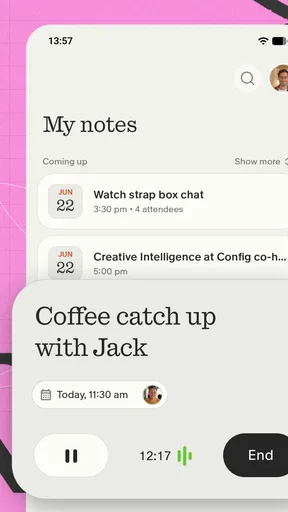
What distinguishes this app from a conventional notes tool is the way it is positioned around the meeting itself. A blank document asks me to create structure before I know what will be important. A normal voice recorder captures everything but leaves me with the unpleasant job of searching through it. Granola sits between those two approaches, aiming to preserve the useful context of a meeting while reducing the amount of manual sorting afterward.
That difference matters in a realistic situation. Imagine a weekly planning call where three people discuss a delayed task, change its owner, suggest a new deadline, and then move on to another subject. If I write notes manually, I may capture the first point and miss the decision. If I record the call without structure, I may have to replay a long section to find the final agreement. An AI notepad is useful when it helps me return to the conversation and quickly separate decisions, responsibilities, and open questions.
I would not treat the app as a replacement for attention. The best results still come from knowing what I need from a meeting before it begins. I get more value when I start with a simple purpose in mind, such as “find the decision,” “track risks,” or “list follow-ups.” That small habit gives the resulting notes a practical destination instead of leaving them as a passive transcript-like record.
The strongest use case is reducing post-meeting work
For me, the most important benefit is not that the app can help capture a conversation. It is that it can shorten the period after the meeting when I normally clean up scattered notes. That period is easy to underestimate. A few minutes after every call can become a large amount of administrative work across a week, particularly when meetings overlap or when several conversations concern the same project.
Worth Reading Before You Choose

EA SPORTS FC Mobile 26 Is a Bigger Football Game, but It Takes Time

Flipboard Shows What News Apps Must Do Beyond the Feed

Switching to Android Auto Means Rethinking Your Driving Routine

Google Calendar Makes a Crowded Week Easier to Manage

Ludo King Makes the Most of the Minutes Between Plans

Baby Panda World Brings Quick Play to Modern Phones, but Its Game Library Feels Busy
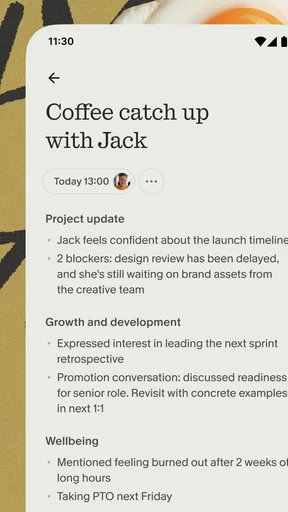
Granola is especially appealing for one-to-ones, client discussions, interviews, planning sessions, and project reviews. These meetings often contain a mixture of background, opinions, decisions, and tasks. A useful AI notepad can help me distinguish those layers, which is more valuable than simply producing more text.
There is also a subtle benefit for people who tend to over-note. Writing down every sentence can make me less present, while writing too little creates gaps later. The app encourages a different balance: I can concentrate on the speaker and add only the context that an automated summary may not understand, such as why a decision matters or which concern remains unresolved.
That human addition is important. AI can identify an apparent task, but I may know that it is only a suggestion, that a deadline is provisional, or that a person volunteered reluctantly. My own short comments provide the judgment that automated organization cannot reliably supply. In practice, the best workflow is not “let the app take over”; it is “let the app handle the repetitive layer while I preserve the meaning.”
Three practical habits that make the app more useful
My first tip is to create a consistent vocabulary for follow-ups. I use short markers such as “decision,” “owner,” “risk,” and “question” in my own notes. Even when the app is doing much of the organizing, these labels give me a dependable way to scan a meeting later. They also prevent an important concern from being mistaken for a completed action.
My second tip is to review the notes while the discussion is still fresh, rather than waiting until the end of the day. A quick pass lets me correct names, clarify ambiguous wording, and remove ideas that were never approved. This is a small step, but it changes the notes from an AI-generated convenience into something I can safely use as a working record.
My third tip is to use the app differently for recurring meetings and one-off meetings. For a recurring team call, I want continuity: what changed since the last discussion, which tasks remain open, and what needs escalation. For a one-off conversation, I care more about the decision, the reasoning behind it, and the next contact. Treating every meeting identically wastes the app’s potential because the useful shape of a note depends on the meeting’s purpose.
A fourth habit is worth mentioning for sensitive work: decide before the meeting what information should not be captured or shared. An AI note-taking tool should not become an automatic dumping ground for confidential material, personal information, or comments that were never meant to become a durable record. That is not a criticism unique to this app; it is a basic responsibility whenever conversations are converted into searchable notes.
What the current release means for different users
The product has reached a visible level of interest, with an average rating of 4.9 from around 1.4 thousand ratings and more than 100 thousand installs. Those figures suggest that the core idea is resonating with early users, but I would read them as evidence of a strong initial experience rather than proof that the app will fit every workflow. Meeting habits vary enormously, and a highly rated focused tool can still be the wrong choice for someone who needs extensive collaboration features.
For an existing user, the current version is best judged by whether it makes the after-meeting routine faster and more reliable. A release number by itself does not tell me how much has changed in daily use, so I would avoid assuming that every future update will transform the product. The sensible approach is to keep a personal check: can I find the main decision quickly, can I identify the next action, and do I trust the notes enough to use them without replaying the whole conversation?
That check also reveals where the app belongs in a wider workflow. Granola is not the same thing as a calendar, a task manager, a shared document, or a complete customer relationship system. I would use it to create a useful meeting record, then move only the durable actions into the tool where my team already tracks work. Copying every generated detail into a project board would create clutter and defeat the time-saving purpose.
This separation is one of the less obvious trade-offs. Keeping notes and tasks together feels convenient, but it can blur the difference between “someone mentioned this” and “the team committed to doing this.” Granola works better when I treat its output as a decision-support layer and deliberately promote confirmed actions into a more formal system.
Where it compares well with familiar alternatives
Compared with a paper notebook or a basic notes app, Granola offers a more practical route to organizing a conversation after it ends. A plain note gives me complete control, which is valuable when I have a very personal system, but it also makes me responsible for every heading, summary, and follow-up. The AI approach saves effort when the meeting is dense or when I am too busy to maintain a detailed structure manually.
Compared with a voice recorder, an AI notepad is more useful for retrieval and interpretation. Audio preserves tone and exact wording, but it is slow to revisit. I would choose recording when the precise phrasing matters or when I need an archival reference; I would choose Granola when my main goal is to understand what happened and what I should do next.
Compared with a general AI chatbot, a meeting-focused app has a clearer job. A chatbot can summarize text that I provide, but it does not automatically solve the practical problem of building a repeatable meeting workflow. Granola’s appeal is its narrower purpose. The limitation is that a specialist tool may feel unnecessary if I only attend occasional meetings or already have a note process that works perfectly.
Compared with a full collaboration suite, this app is lighter. That can be a strength for an individual who wants less setup, but a weakness for a team that requires permissions, structured project links, extensive integrations, or a formal audit trail. I would not replace an established workplace system with it without first checking how the notes fit into existing responsibilities and information-handling rules.
Who should use it, and who should skip it
I think it is a strong match for people who finish meetings with too many loose ends. Managers moving between one-to-ones, consultants switching between clients, recruiters conducting several conversations, and students handling group projects can all benefit from reducing the time spent turning discussion into usable notes. It is also attractive for anyone who is good at listening but inconsistent at documenting.
It is less compelling for someone who rarely attends meetings, prefers handwriting, or needs complete manual control over every sentence. It may also be the wrong choice for highly regulated or confidential environments where an AI-generated record requires approval before it can be stored or circulated. In those situations, a controlled internal system or a carefully managed manual process may be safer and easier to defend.
People who expect the app to identify every nuance should also moderate their expectations. AI can help expose structure, but it can misunderstand a speaker, flatten disagreement, or make a tentative idea sound final. I would never send meeting notes to a client or colleague without reading them first. That review is not optional when the notes influence commitments, budgets, personnel decisions, or sensitive relationships.
The gaps I would keep in mind
The first remaining gap is trust. The more important the meeting, the less willing I am to accept an unreviewed summary. This creates a practical trade-off: the app saves time, but the time saved depends on how much verification the conversation requires. For routine internal updates, the review can be brief. For negotiations or complex technical discussions, it may still take real attention.
The second gap is workflow depth. A good meeting note is only the beginning. I still need a dependable place for tasks, due dates, documents, and ownership. If I expect Granola to become the entire productivity system, I may find the experience incomplete. If I use it as the front end for capturing and clarifying conversations, its focused design makes more sense.
The third gap is personal fit. Some people think more clearly by writing their own outline during a meeting. For them, automation may feel like an extra layer rather than a shortcut. Others may prefer a simple checklist because they do not need summaries at all. The app earns its place when the problem is not merely remembering information, but processing a high volume of conversations without losing the decisions inside them.
There is also a social consideration. Participants may feel differently about AI-assisted note-taking, and a professional workflow should account for that before a meeting begins. I would be transparent where the context requires it, avoid capturing conversations casually, and make sure the resulting notes are treated as a working aid rather than an unquestionable transcript.
What I would watch as the product develops
Because the app is still identified by a specific production version, I would pay attention to how Granola Inc develops the balance between automation and user control. The most valuable progress would not necessarily be more generated text. I would rather see clearer ways to distinguish decisions from suggestions, preserve unresolved questions, correct mistakes quickly, and carry confirmed actions into the rest of a productivity workflow without creating duplicates.
I would also watch whether the experience remains approachable as capabilities grow. The product’s appeal comes from reducing friction for people already overloaded with meetings. If future changes add too many layers, settings, or destinations, the app could become another system to maintain. The best evolution would make the first useful note easier to create while giving experienced users more control when a meeting deserves careful handling.
For now, I see Granola as a focused productivity companion rather than a universal office platform. Its free price makes trying it straightforward, and the Everyone rating keeps the entry barrier broad, but the real question is not whether AI meeting notes sound useful. The real question is whether my current meeting notes are costing me time, losing decisions, or leaving tasks unclear.
My recommendation is simple: if meetings fill a meaningful part of your week, try it with a recurring conversation and judge the result by the follow-up work it removes. Review the notes, correct what matters, and move only genuine commitments into your task system. If that routine helps you stay present and still leave with a reliable record, Granola - AI Meeting Notes has a clear role in your day. If you already have a trusted manual method or need a complete team workspace, another option may serve you better.
In my experience, the app’s strongest promise is not replacing the notebook. It is protecting attention during the meeting and giving me a cleaner starting point afterward. The useful test is whether it turns conversation into confident action, not merely more text.
Pros
- Creates concise meeting summaries automatically.
- Highlights key decisions and action items clearly.
- Works with popular video conferencing platforms.
- Searches past meetings for specific details quickly.
- Reduces the need for manual note-taking during calls.
Cons
- AI summaries may occasionally miss context or speaker intent.
- Some advanced features may require a paid subscription.
- Requires access to meeting audio and related permissions.
- Limited usefulness for meetings with poor audio quality.
- Privacy concerns may matter when recording sensitive discussions.
FAQs for Granola - AI Meeting Notes
What is Granola - AI Meeting Notes, and how does it work?
Granola is an AI-powered meeting notes app designed to help you capture, organize, and improve notes from conversations. It can work alongside your meeting workflow, using your typed notes and, where supported, meeting audio or transcripts to create clearer summaries, key points, decisions, and action items. The app is especially useful for people who attend frequent work calls and want to spend less time formatting notes afterward.
Does Granola record meetings automatically, and do participants need to give consent?
Granola’s recording and transcription behavior can depend on the platform, meeting setup, and permissions you grant. Before using any audio-related feature, check the app’s current settings and local laws regarding recording conversations. In many workplaces and regions, everyone on the call must be informed and may need to consent. If you prefer not to record, you can generally use the app as a structured workspace for manually written notes.
Which meeting platforms and devices are compatible with Granola?
Compatibility may vary according to the version of Granola and the operating system you use. The service is primarily intended to fit into desktop meeting workflows, while mobile access may focus on reviewing or managing notes rather than providing every desktop feature. Before downloading, confirm whether your preferred video-conferencing tools, calendar, microphone permissions, and device are supported, particularly if you need automatic capture or integrations.
Are Granola’s AI-generated summaries accurate and safe to rely on?
Granola can save considerable time by turning meeting information into organized summaries, but AI-generated notes are not guaranteed to be perfect. Names, technical terms, numbers, decisions, and action items should be checked against the original discussion. Avoid treating an automatically generated summary as the sole official record for sensitive or important meetings. Review the privacy policy and workplace requirements before processing confidential information.
Is Granola - AI Meeting Notes free to use?
Granola may offer a limited free experience, trial access, or subscription-based plans, depending on the current pricing model and your location. Premium features can include higher usage limits, advanced AI capabilities, integrations, or longer-term note access. Always review the price, billing frequency, trial conditions, cancellation rules, and what happens to your stored notes before starting a paid plan through the app or its website.


